I work best in the gaps between content, design, media, tools, apps and operations: shaping awkward workflows into websites, utilities and working systems that people can actually use.
range
A long career in the awkward space between creative and technical work.
web & systems
I make digital life easier.
I have worked across WordPress, hosting, newsletters, video workflows, image handling, analytics, troubleshooting and internal tools, usually in places where the technical, editorial and operational work all overlap.
My strength is seeing the whole system: what the editor needs, what the audience sees, what the CMS allows, what the server is doing and where the process wastes everyone’s time.
I like taking inherited digital machinery and making it clearer, faster, more reliable and less dependent on workarounds.
AI approach · AgentOS
AgentOS gives forgetful AI a project memory.
Every new coding session can feel like a brilliant builder turning up with no memory of yesterday. The code is there, but the reasons, promises, unfinished work and hard-won lessons may not be. Handing it one giant manual just creates a different problem: the warning that matters gets lost in the pile.
AgentOS is the useful middle. It keeps the project’s memory beside the code, then gives the AI only the slice that matters for today’s job. A small front door leads to the current plan, the right decisions and the rules that must not be broken—without making every task read the whole library.
It also keeps confidence honest. A plan is not a fact. A test proves only what it actually tested. Useful discoveries are saved for the next session; stale notes and finished handoffs are cleared away. The system starts small and grows only when a real problem earns more structure.
Most of it is deliberately ordinary: a short instruction file, a map and readable notes beside the code. Different coding assistants can share that memory without creating competing versions of the truth. An optional helper finds relevant notes and catches mechanical problems, but stays in its lane.
AgentOS does not run the agents or replace Git, tests or human judgment. It simply helps a capable assistant arrive prepared, show what it can prove and leave the project easier for the next one to understand.
I have 20+ years of video experience, from transferring MiniDV and Betacam SP material for Barbara Corcoran’s NBC segments to filming interviews and market coverage in places like Cannes for World Screen.
That work grew into a full production workflow: shooting, editing, encoding, publishing, archiving and cutting promotional material under real deadlines. At World Screen, I produced roughly 1,500 video interviews, event reports and promotional videos tied to the international TV business.
That work gave me a practical understanding of the whole chain: preparation, capture, lighting, framing, audio, editing, compression, formats, playback and delivery. You learn quickly that video is rarely made in perfect conditions. It is bad rooms, backlight, background noise, difficult color, mismatched cameras, awkward codecs and broken playback, then finding a way to turn imperfect material into something usable and publishable.
Outside my day job, that interest has kept widening. I started shooting more cinematic video in 2008, when the Canon 5D Mark II made shallow depth of field and large-sensor video suddenly feel accessible. Since then I have kept experimenting with composition, light, lenses, frame rate, depth of field and the settings that shape how an image feels, while also getting pulled into less standard media: VR180, 360 video, spatial video, 3D, projection, upscaling, interpolation, immersive playback and self-hosted media systems. I am interested in both sides: the image itself and the system that gets it to someone’s screen.
photography
Photography trained my eye.
I got my first SLR when I was 15 and started reading photography books before I really knew what I was doing. The interest was always both technical and visual: cameras, lenses, light, composition, color, focal length, exposure and the small choices that change how an image feels.
Getting a DSLR in 2005 opened the floodgates. I could shoot constantly, work in RAW, experiment properly and learn from the feedback loop. Since then I have done a lot of client photography, mostly portraits, along with retouching, image selection, two weddings and plenty of practical work making images polished, usable and appropriate for the job.
Photography trained a useful reflex: looking at a scene and immediately seeing the trade-offs. Light direction, background, distortion, crop, expression, depth of field, noise, sharpness, color and where the eye goes first. I use Lightroom and Photoshop, mostly Lightroom, and I still follow camera technology closely, from sensors and colour science to phone cameras and computational photography.
I like the nerdy machinery of image-making, but I also like the simple pleasures: faces, atmosphere, golden hour, pinks and yellows, stereo photography and the moment when an ordinary scene becomes worth keeping.
writing
I can actually string a sentence together.
A shocking amount of technical friction comes down to the fact that nobody wrote down clearly what the thing is supposed to do. I fix that.
From punchy product copy to plain-English documentation for executives, I translate complex systems into words that human beings can actually tolerate reading.
newsletters
I sent 300 million marketing and news emails
First, my apologies. Second, I know mass email a little too well. Newsletter construction, delivery quirks, deliverability and landmines.
The work covered the whole unpleasant chain: HTML construction, inline styling, image handling, link tracking, list segmentation, subject lines, advertiser materials, test sends, rendering problems, delivery quirks and the strange little disasters that appear five minutes before send.
What I learned is that email is less about elegance than reliability. You need systems that are repeatable, hard to break and clear enough that small mistakes do not become public ones. I know how to keep campaigns moving, how to spot trouble early and, more importantly, what usually breaks.
current projects
Live sites, tools and experiments that grew out of actual problems.
Piilo
NATIVE iOS APP · PUBLIC BETA
Get your stuff together.
Store anything in anything. Piilo remembers where.
Local-firstPrivate by defaultTestFlight betaBuilt for real homes
Home
Bedroom
Closet
Blue box
Passport
THE PROJECT
A home inventory app that does not feel like inventory software.
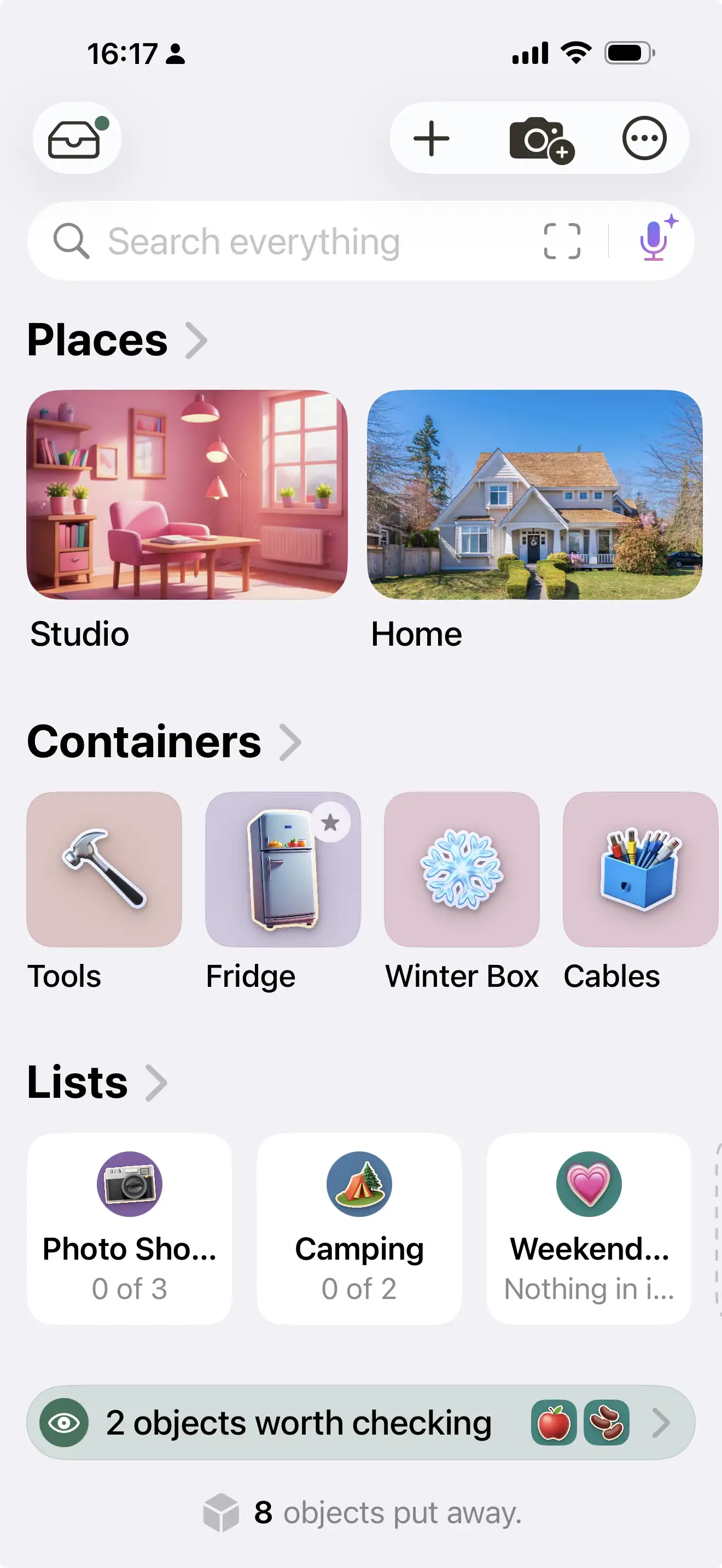
Piilo is my biggest current project: a native app for remembering where things live. I built it because the apps I tried were either spreadsheets in disguise or rigid catalogues that made a simple job feel administrative. I wanted something useful while standing in a cluttered room with a phone in one hand and an object in the other.
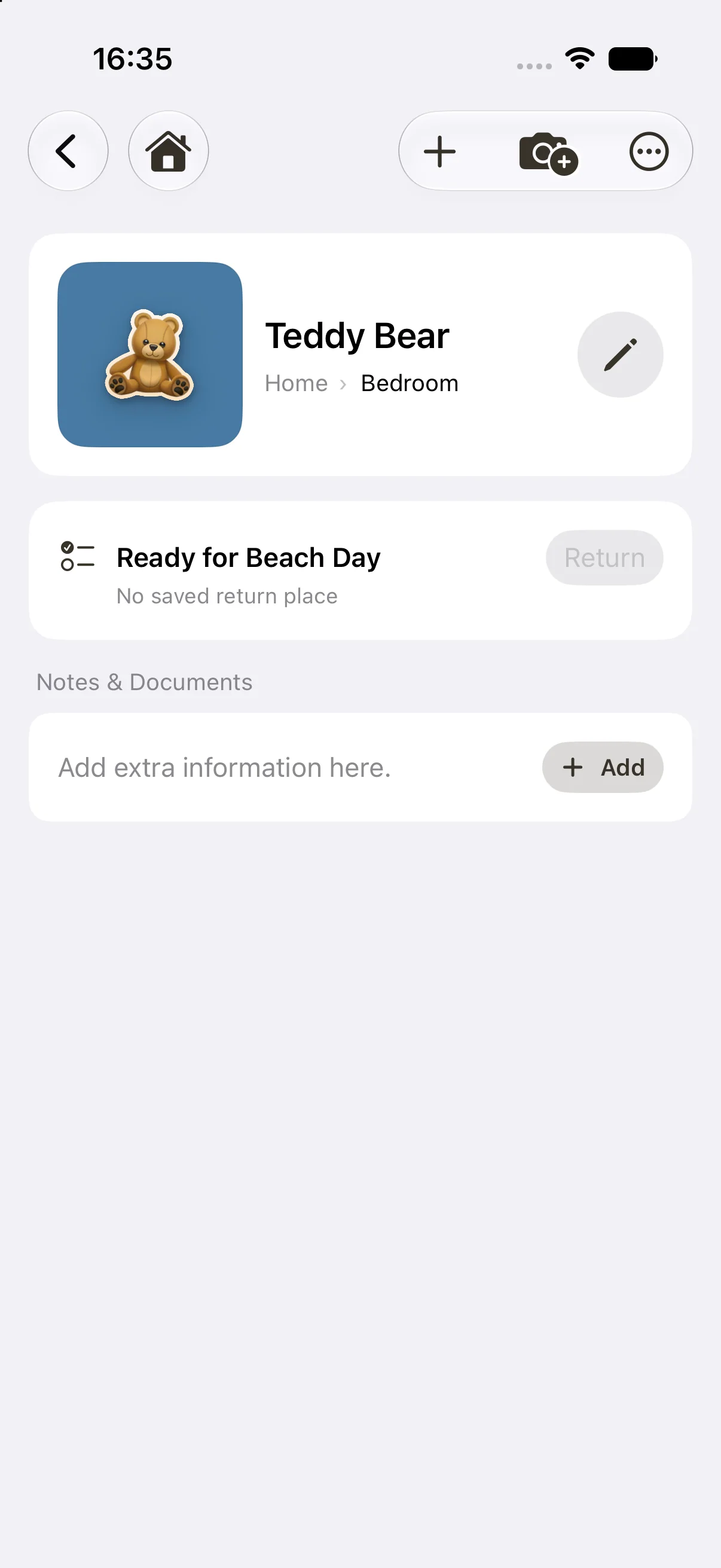
The central idea is deliberately simple. A camera can be in a box, the box in a closet, the closet in a bedroom and the bedroom in a home. Piilo records the whole physical route, then brings it back through ordinary search. Any thing can become a container later, so the model follows real life instead of forcing every home into a fixed taxonomy.
ONE CONTAINMENT MODEL
Things inside things inside things.
Places, rooms, drawers, shelves, bags, boxes and objects all belong to the same flexible tree. That sounds like an architectural detail, but it is what lets the interface use normal household language while keeping every path accurate.
Home›Bedroom›Closet›Blue box›Camera
THE USEFUL BITS
The model grows into practical everyday tools.
FIND
Search returns the whole route
Finding “Camera” means finding Home › Bedroom › Closet › Blue box, not just a detached record with a location field.
LISTS
Pack it, then put it back
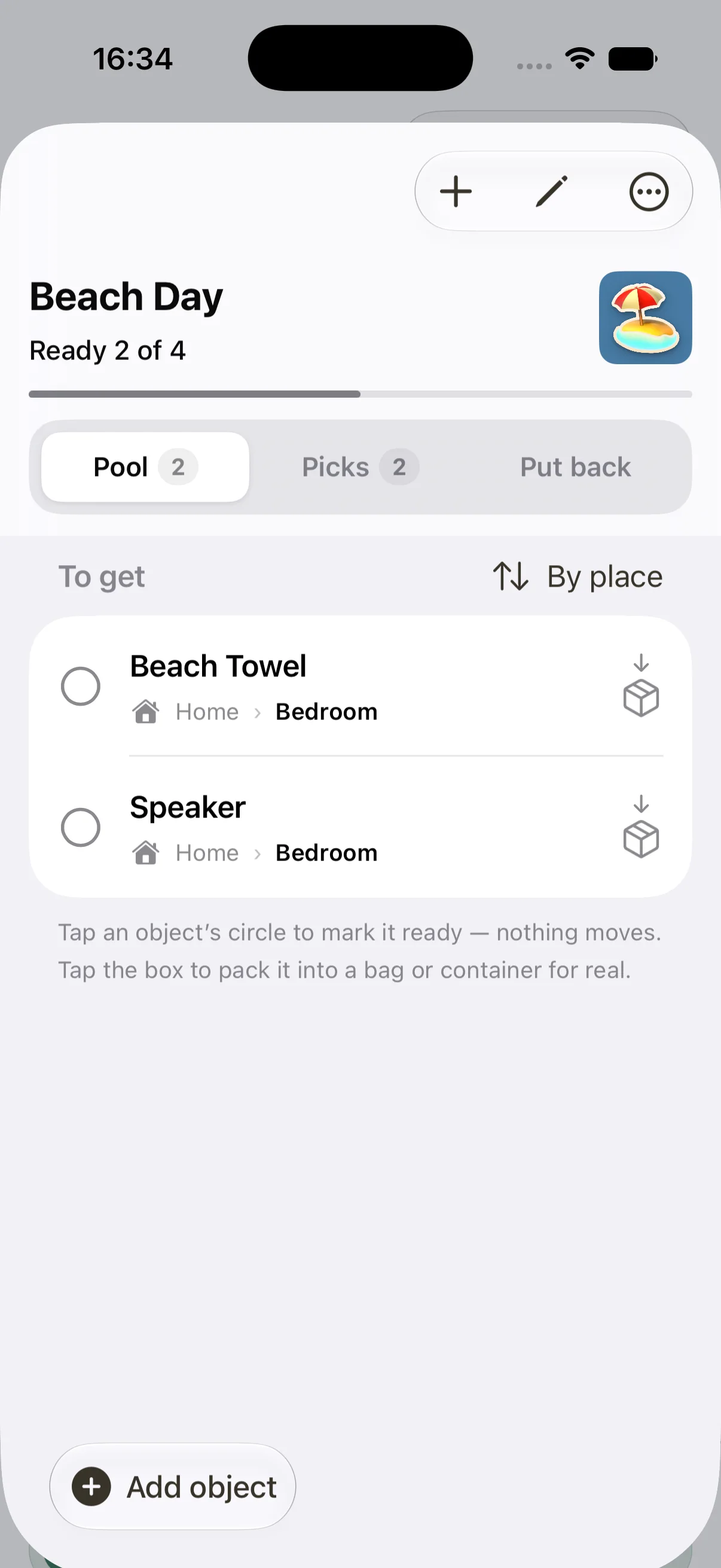
Lists can gather real things into a bag and remember where each one came from, so unpacking has a genuine Put back action.
LABELS
Open a box from the outside
Printable QR labels and writable NFC tags deep-link to the right container and show its contents without unpacking it.
REMEMBER
The exceptions real life creates
Perishables, lending, active drawers and busy bags add reminders and quick checks without turning the whole app into a task manager.
PRODUCT DESIGN
A serious system with a softer face.
Piilo starts nearly empty and becomes recognizably yours as photographs, symbols, colors and real belongings fill it in. The interface has four visual identities—Piilo, Pop, Nova and Play—but the underlying information and interaction rules stay consistent.
HomePlaces and things at a glance
ListsPick, pack and put back
ObjectUseful detail without clutter
THE SYSTEM UNDERNEATH
Local-first is a product decision, not a slogan.
A person may be recording valuables, documents and the inside of their home. Piilo therefore starts on-device, needs no account, runs without a connection and sends nothing to a server of mine. iCloud sync and household sharing are optional. The same care extends to export, backup and thirty-day recovery for deleted material.
The project now spans the core app, widgets, a share extension, Siri and Spotlight integration, QR and NFC routes, portable backups, multiple device shells and a public beta website. Keeping all of those surfaces consistent has made it as much a systems and product-design project as an app.
SwiftUI interfaceSwiftData local storeOptional iCloud + household sharingWidgets, Share Sheet, Siri + SpotlightQR/NFC deep links + portable backupsPublic beta on TestFlight
LIVE NOW
Piilo is in public beta. The website explains the idea, shows the app in use and links directly to TestFlight.
A live example publication built to prove The Signal Room's editorial workflow
Live example siteWordPress proof publicationSignal Room output
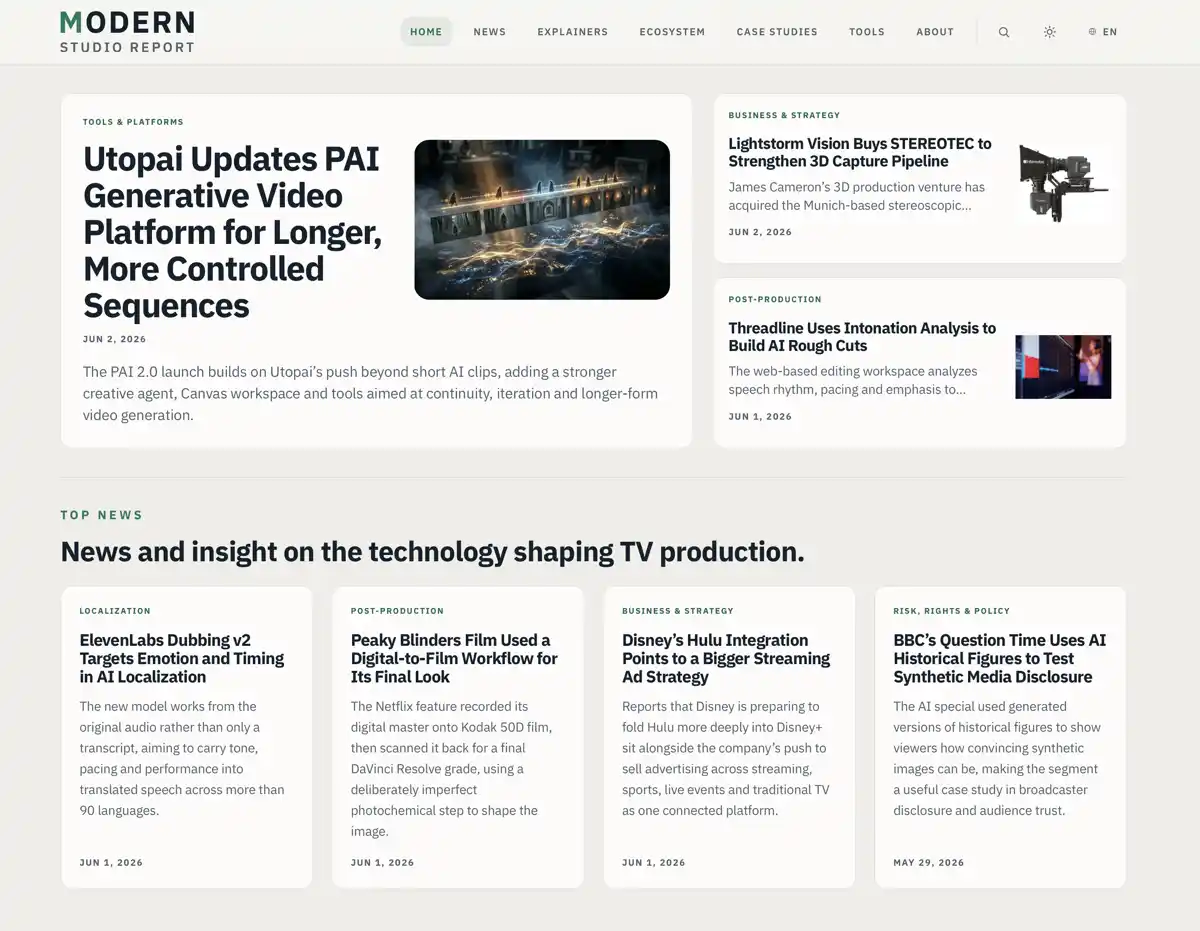
Modern Studio Report is a live example trade publication I built to prove the wider Signal Room workflow from incoming material to a finished public site. It shows how coverage of AI, cloud workflows, virtual production, localization, rights and production tools could be structured and presented. The site is fully functional and online, but it is not being run as an actively updated newsroom.
After 17 years inside TV trade publishing, I had seen the industry change dramatically: streaming, cloud production, AI tools, virtual production, automated localization, new rights questions, new buyer behavior, new pressure on marketing teams, and a lot of confusion hiding behind confident language. I wanted to build a site that treated those shifts seriously without sounding like a technical brochure or another breathless AI newsletter.
It was designed for people who need to understand this stuff without becoming specialists: studio executives, production teams, distributors, marketing departments and service companies. The tone is plain English, but not dumbed down.
WHAT THE SITE CONTAINS
A structure built for more than daily news.
01
News
Fast-moving coverage of production technology, business shifts and industry change.
02
Explainers
Plain-English context for complex tools, workflows and technical terms.
03
Ecosystem
Company and platform profiles that map the people building the new stack.
04
Case Studies
Structured evidence around what changed, what worked and what failed.
05
Tools
Practical decision aids for evaluating production technology.
EDITORIAL MODEL
The example site runs on WordPress with a custom theme and a publishing structure designed around the needs of a modern B2B media brand. It includes news, features, explainers, company profiles, case studies and a separate tools section. The editorial model demonstrates how one system could support both fast-moving coverage and slower reference material, working as a publication and a useful industry resource over time.
A lot of the work is in the structure. Explainers are designed to give clear context around subjects like AI dubbing, virtual production, synthetic media, cloud workflows and production automation. Company pages help map the ecosystem. Case studies are built to capture the practical side of technology adoption: what problem was being solved, what changed, what worked, what failed and what should be treated with caution. I wanted the site to do more than rewrite launch announcements
HOMEPAGE LOGIC
The homepage is configurable and editorially controlled, with sections for lead stories, briefs, explainers, company highlights and discovery. It can be curated manually or filled automatically, with logic to prevent repeated stories and preserve the layout even when the content mix is sparse. Many publishing layouts fall apart the moment the content mix is imperfect. I wanted the example to prove the system could handle real-world mess.
SEARCH & DISCOVERY
Search is also treated as part of the experience rather than a default WordPress afterthought. One of the ideas I liked most was having clean editorial blocks transform into search results, so discovery feels like part of the publication rather than a trip to a separate utility page. The homepage browse area, archives and search hub are meant to help users move naturally from reading into finding.
SEARCH BECOMES EDITORIAL
A search result should still feel like a publication.
SearchAI dubbing
BEST EXPLAINERAI dubbing workflow
A plain-English guide to automated localization, voice matching and approval risks.
RELEVANT COMPANYCloud localization platform
Company profile · Source indexed · Production tools
PRACTICAL TOOLRights readiness checklist
Tool · Updated recently · Questions before adoption
Search becomes a guided editorial surface, not a generic results page.
DESIGN SYSTEM
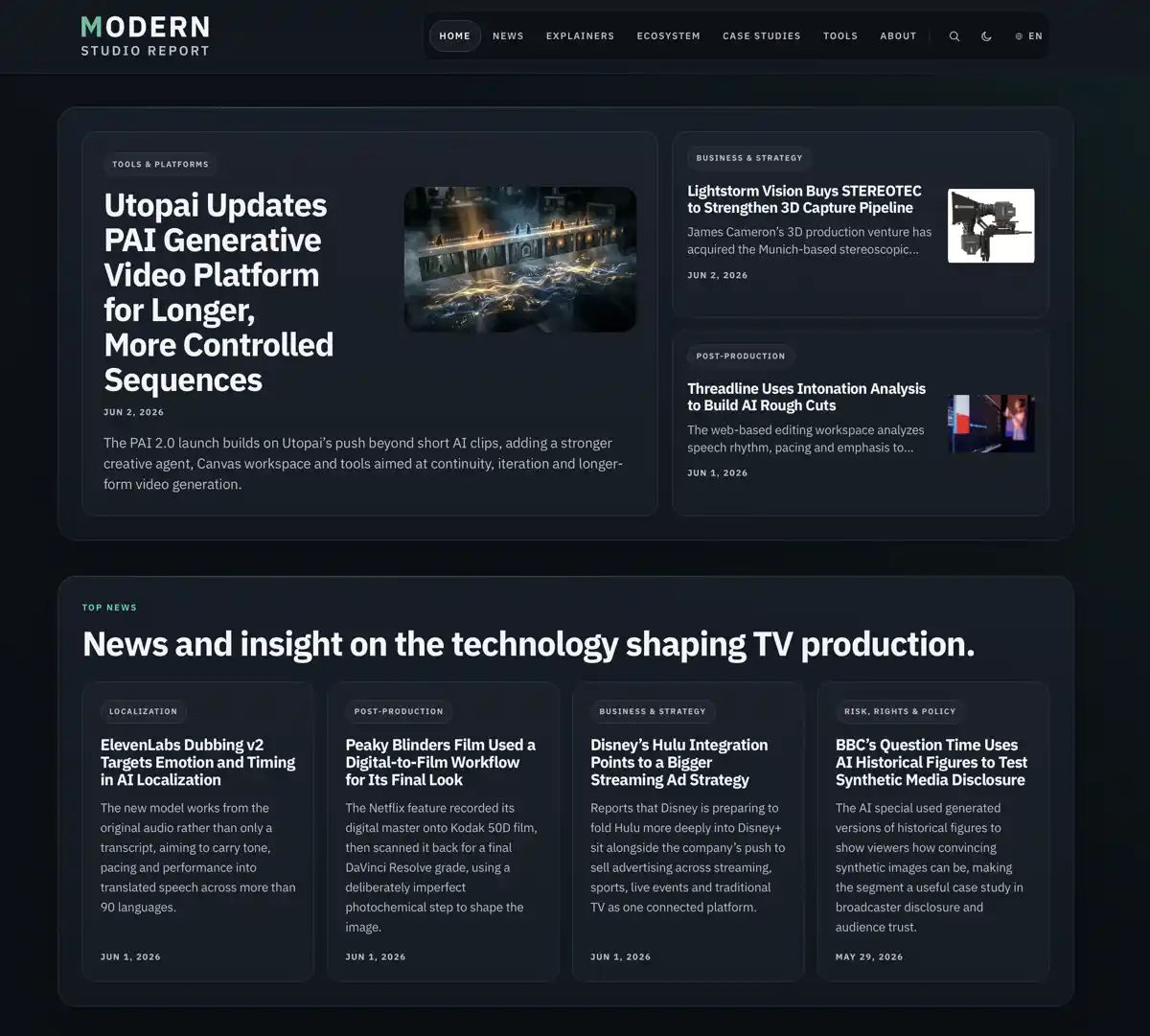
The design has two related but distinct modes rather than a simple light/dark color swap. Light mode is airier, more open and a little more newspapery. Dark mode leans further into a sleek, app-like interface, with more contained panels and a stronger sense of depth. That decision came from building several projects and realizing that theme switching is a wasted opportunity if it only changes the background color. People who prefer dark mode often seem to want a different mood, not just the same site inverted.
TWO MODES, TWO MOODS
Same site, different atmosphere.
There are also many smaller details that may go unnoticed, but still shape the experience: careful card layouts, image handling options, logo fallbacks, article deks, further-reading links, cleaner archive filters, useful empty states, theme-aware interface elements and admin conveniences to reduce repetitive publishing work. Beneath that surface is a deeper layer of custom structure, both front end and back end, built to make WordPress behave less like a generic theme and more like a tailored editorial platform. I wanted the public site, the publishing workflow and the back-end logic to feel like one system.
Incoming feeds→Signal Room→Human judgment→Draft→WordPress→Modern Studio Report
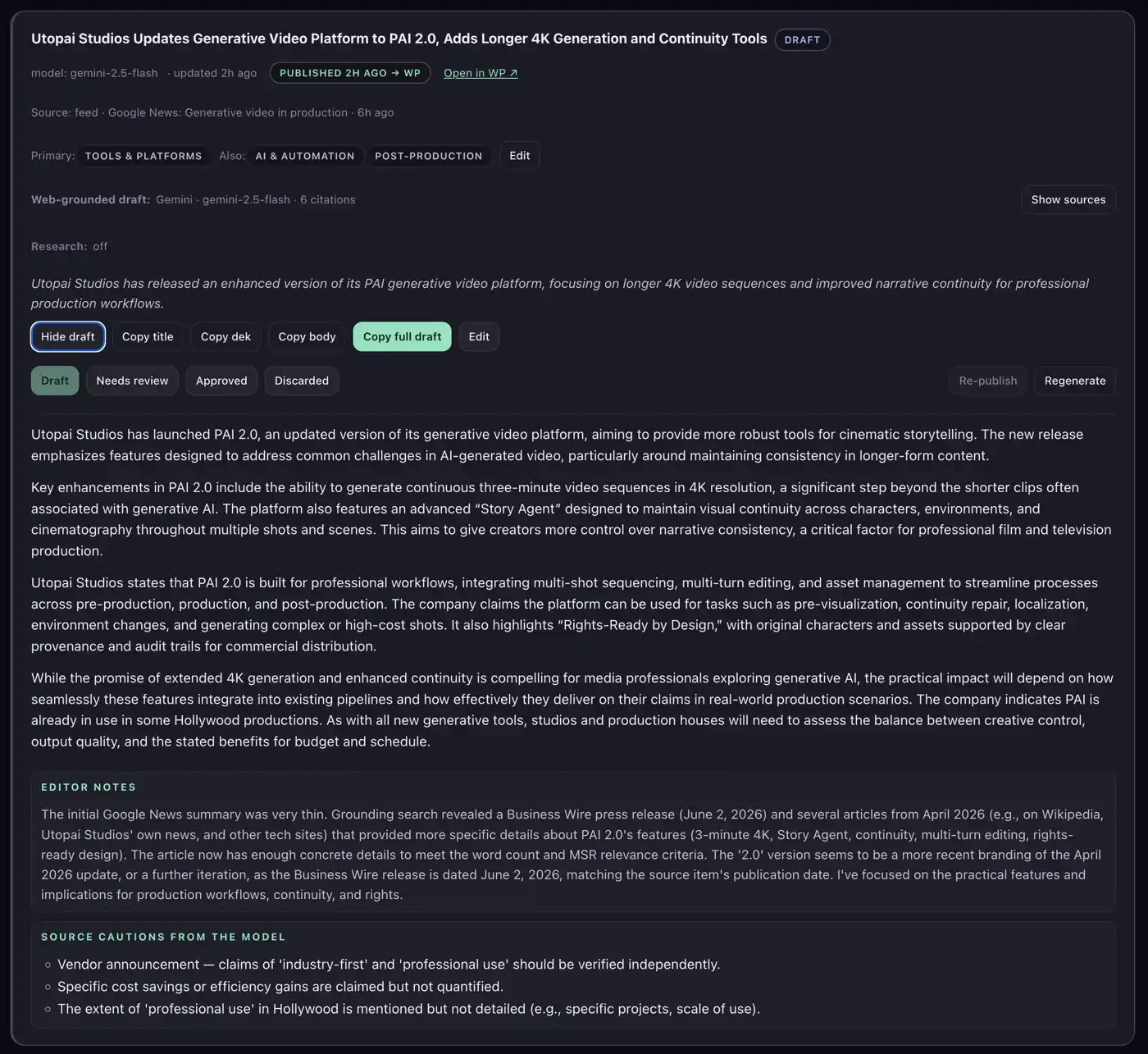
The publishing workflow extends beyond WordPress. I also built an external editorial dashboard, The Signal Room, to help collect, score and sort incoming industry stories from feeds and other sources. It supports AI-assisted drafting, but with human judgment still in charge. Modern Studio Report is the public proof surface for that wider system: a working example showing the site, workflow and editorial engine operating together.
The project pulls together most of the work I know how to do: writing, editing, design, WordPress development, information architecture, automation, AI workflow design, search and publishing operations and the grim little details that make systems either pleasant or unbearable to use. It involves writing, editing, design, WordPress development, information architecture, automation, AI workflow design, search and publishing operations. It has also been a useful test: what I can build when I am not just maintaining an existing system, but deciding what the system should be.
Under the hood: Built with an algorithmic homepage fallback, a dedicated
high-relevance Ajax-backed search hub, and intelligent authoring conveniences like safe SVG
ingestion and remote title resolution.
THE SIGNAL ROOM
A local editorial cockpit for finding usable stories in the news firehose.
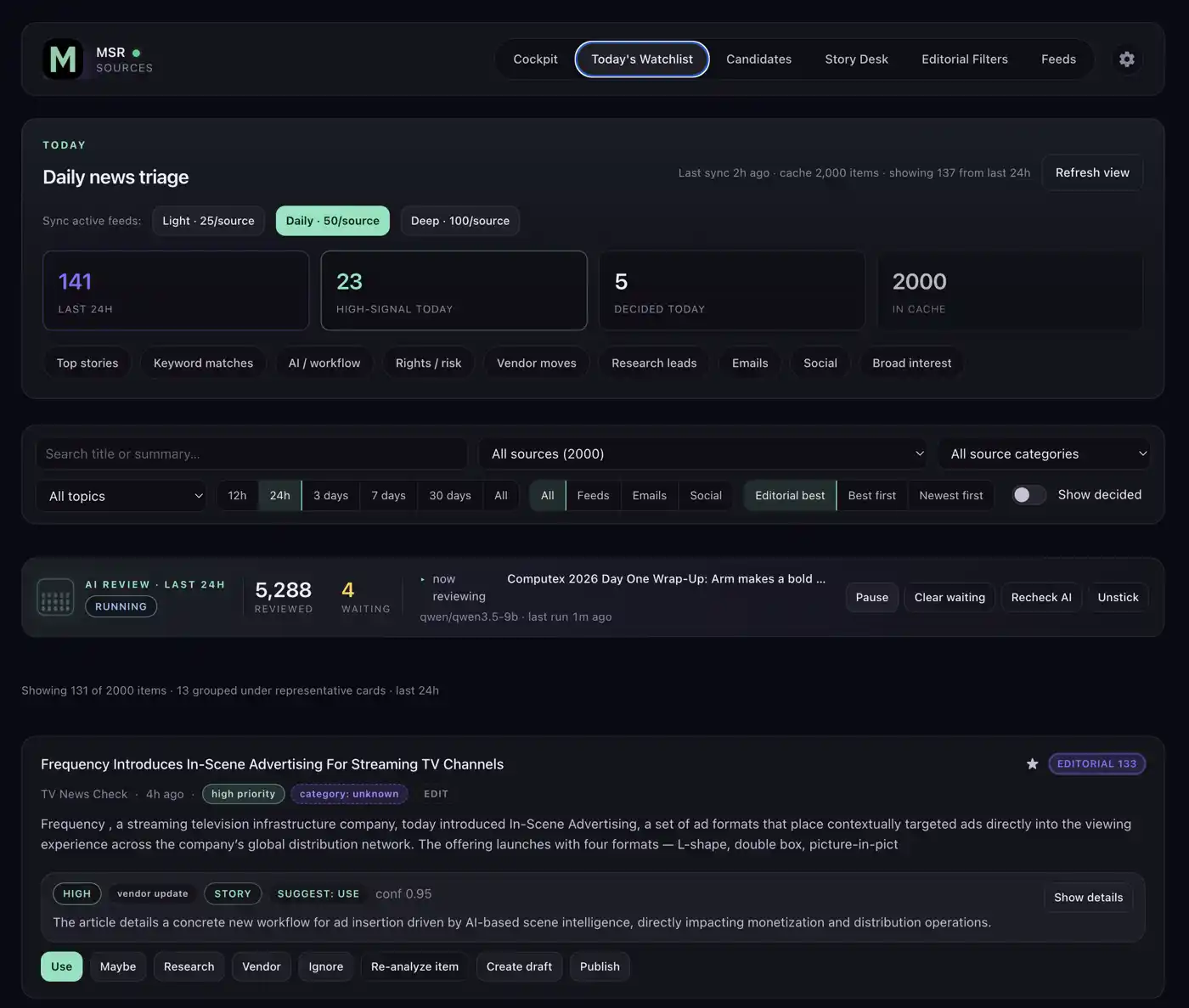
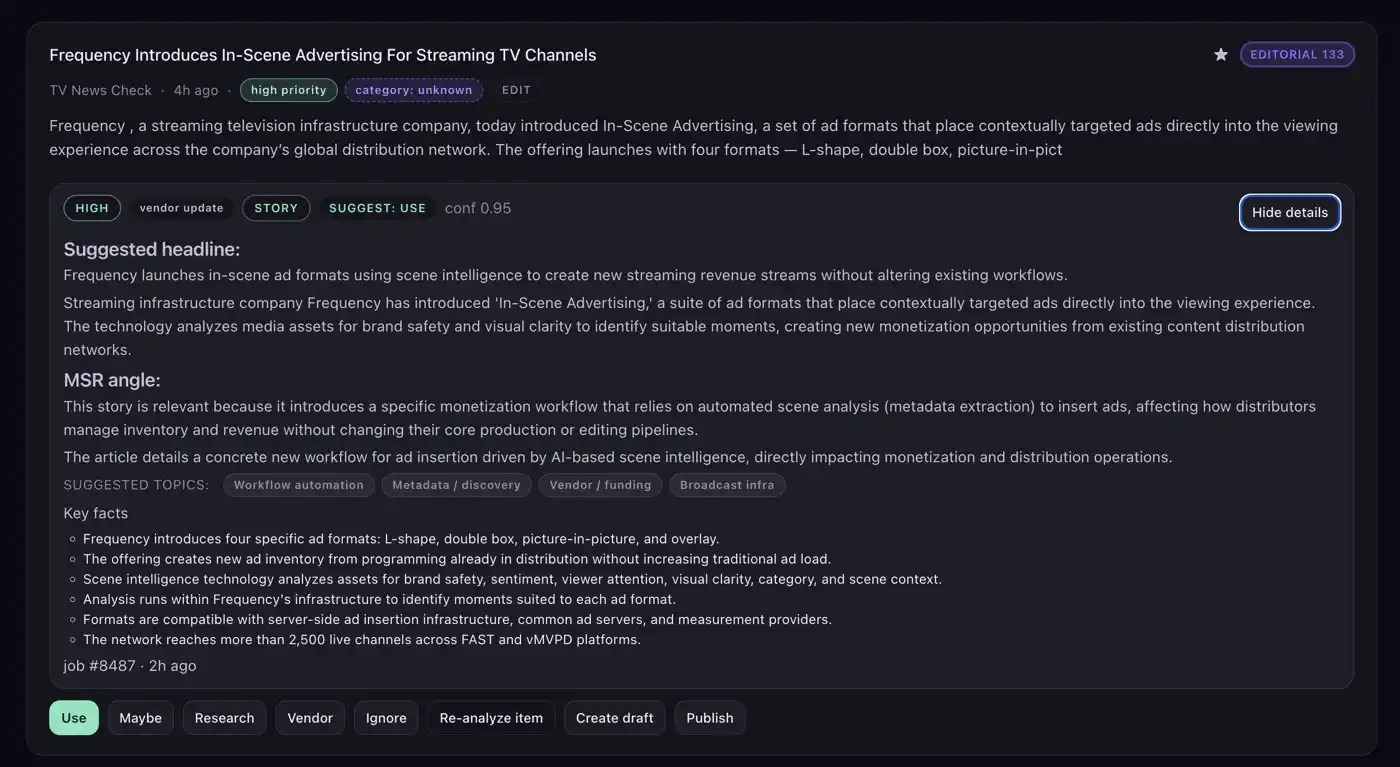
The Signal Room is a local-first editorial cockpit I built for Modern Studio Report: a private workspace for collecting incoming industry material, ranking it, grouping duplicates and deciding what deserves attention before anything becomes a draft.
It is built around one of the most tedious parts of trade publishing: reading dozens of press releases, working out which ones matter and rewriting the useful ones into short news items that often add little beyond making the release usable. Feed, email and social ingest are designed to take on more of that first-pass grind, freeing the editor for work that actually benefits from a human being: interviews, reported pieces, analysis and deeper features.
It pulls the noisy parts of trade publishing into one place: feeds, source lists, emails, social ingest paths, story clusters, AI review queues, draft generation, model settings and WordPress handoff. The working principle is simple: cheap deterministic signal first, optional AI second, human judgment always in charge. When AI is used, it can also research around an item and provide context, so the draft is not just a laundered press release with nicer shoes.
Before any model is asked to think, the system uses explainable scoring, source weighting and story grouping to reduce the mess. AI is used where it helps with judgment or drafting, not sprayed over the product because AI is fashionable.
The system is built around task-based model selection rather than one fixed AI provider. Item review, story matching, social triage, drafting and research-assisted writing can each be pointed at the model or provider that makes sense for the job: local when privacy, cost or speed matter; cloud when web grounding or stronger drafting is worth the trade-off.
Item review
Relevance, action, confidence
Story matching
Clusters, fingerprints, same-story checks
Social triage
Keyword gate, optional LLM
Drafting
Local or cloud drafting modes
Research-assisted writing
Search-grounded context
TASK ROUTERPer-task model choice
Local model
Private, cheap, controllable
OpenAI-compatible provider
LM Studio or similar endpoints
Gemini / grounded web
Grounded drafting option
OpenAI web search
Web-search drafting option
Brave research snapshot
Research before drafting
WordPress draft handoff
Human approval stays required
The workflow can route different jobs to different models: local when privacy, speed or cost matter; cloud when research or stronger drafting is worth it.
PRODUCT VIEWS
Screens from the working tool.
The Signal Room
Watchlist overviewAI review detailDraft workspace
BUILT AS A WORKING LOCAL SYSTEM
Practical machinery, not a landing-page sketch.
INGEST
Feed sources
Email worker
Social ingest paths
Local cache
TRIAGE
Deterministic scoring
Story clustering
Optional AI review
Human decisions
OUTPUT
Draft generation modes
WordPress REST handoff
WordPress drafts by default
565+ tests
Built as a single-user local editorial system, not an enterprise newsroom platform. The point is practical leverage: one editor seeing more signal, wasting less time and keeping the final decision human.
Under the hood: React + Vite, Express, SQLite, deterministic scoring before AI review, story-group deduplication, local model routing, cloud drafting options and WordPress REST handoff.
PORTFOLIO CASE STUDY
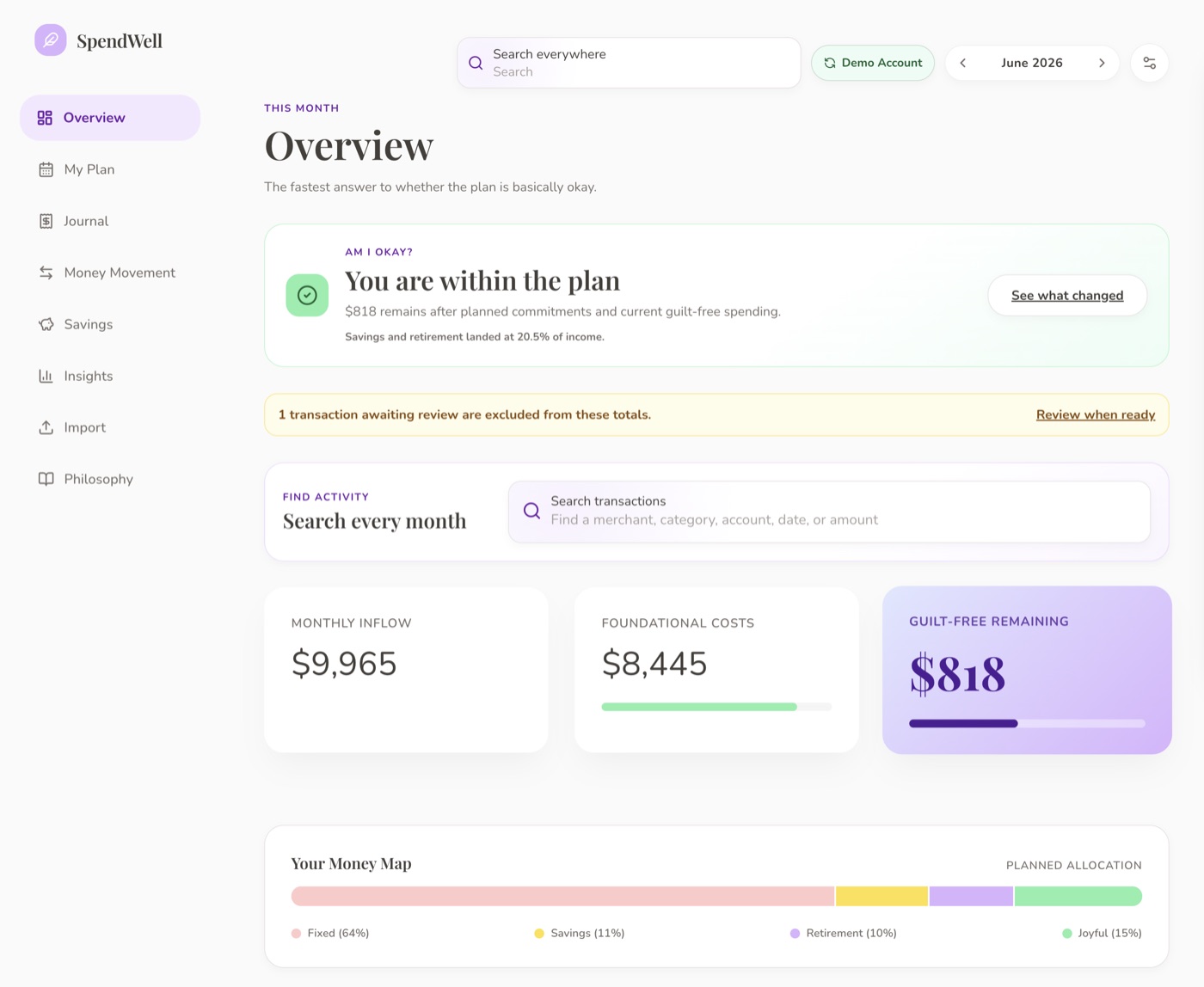
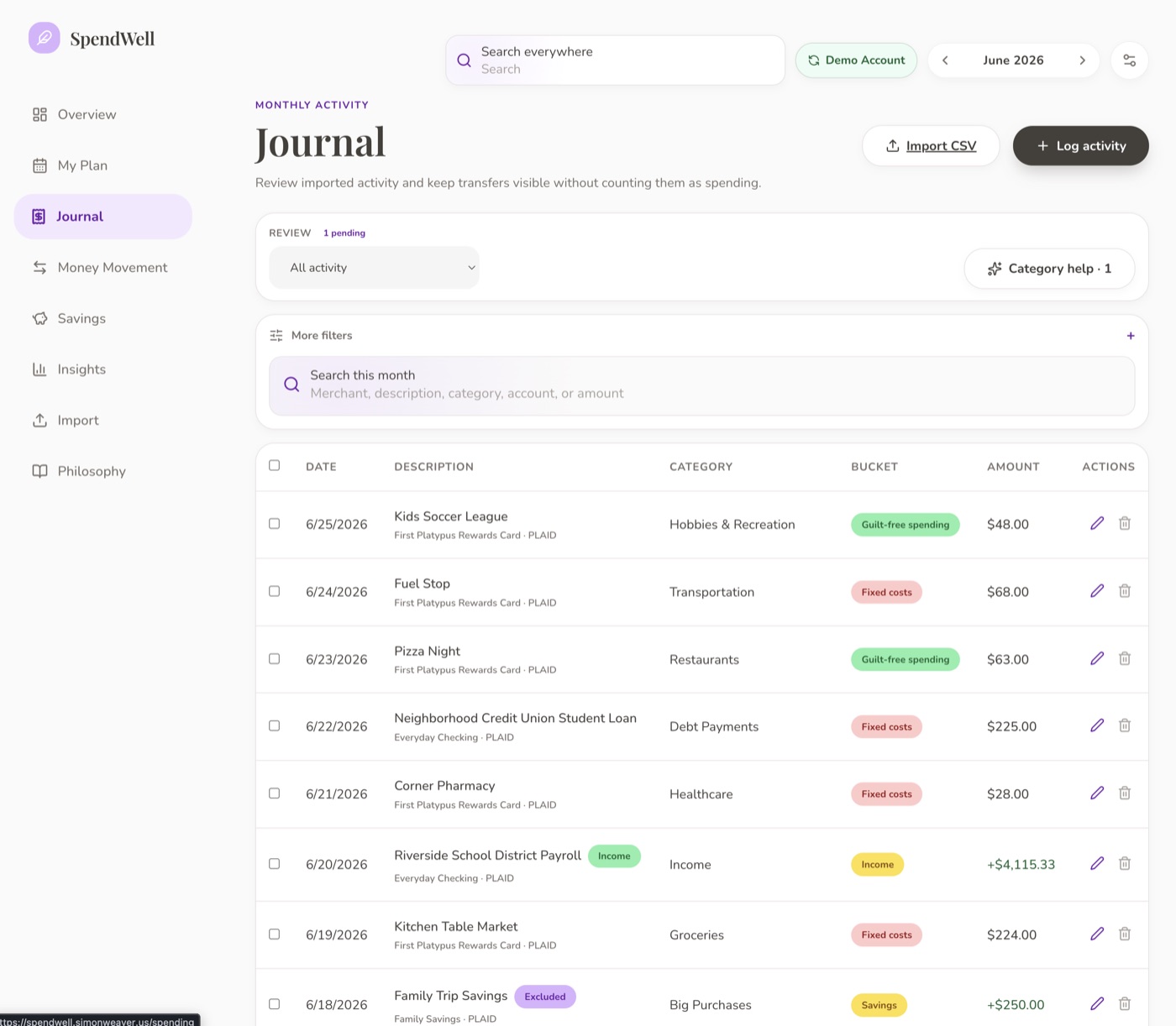
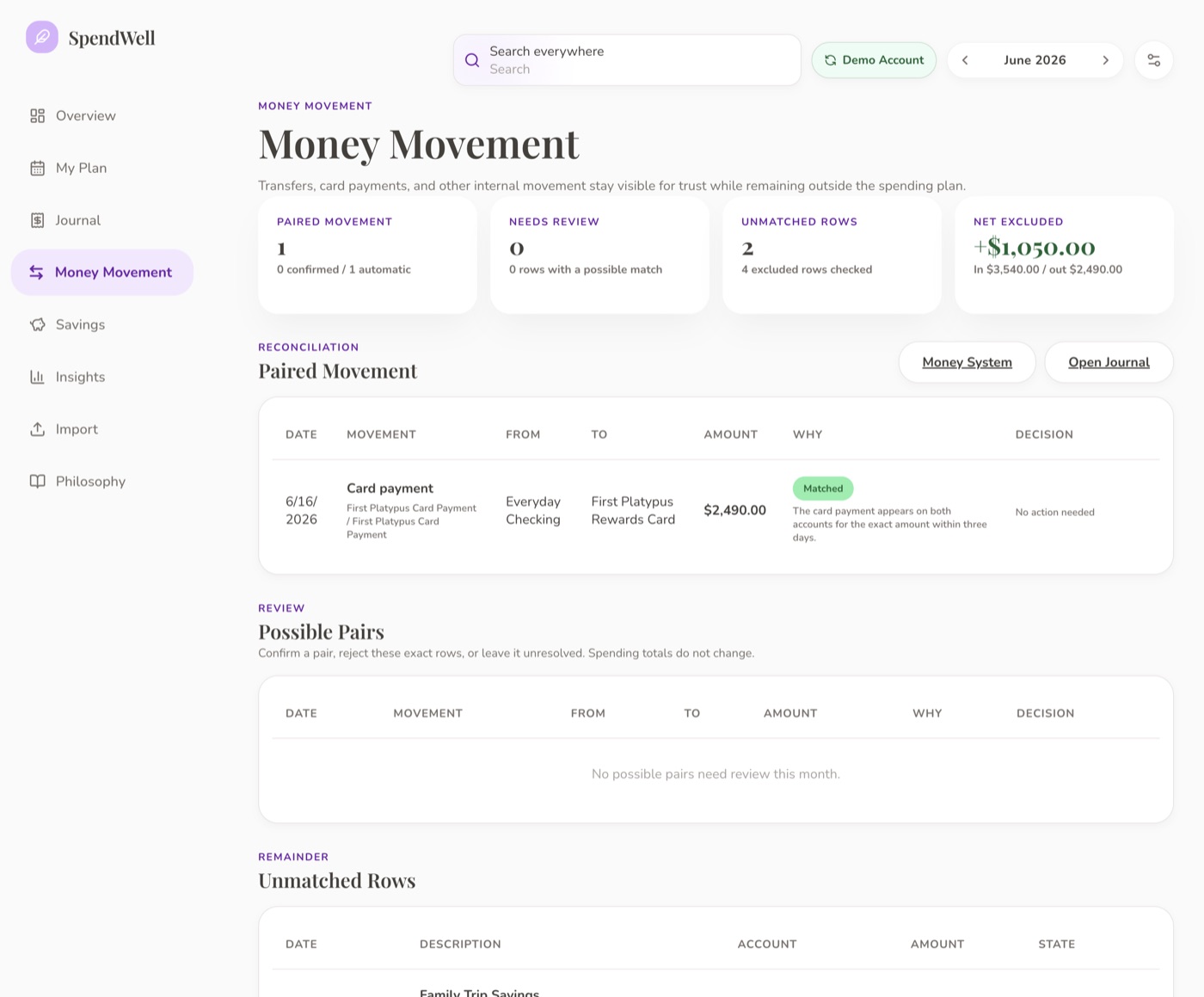
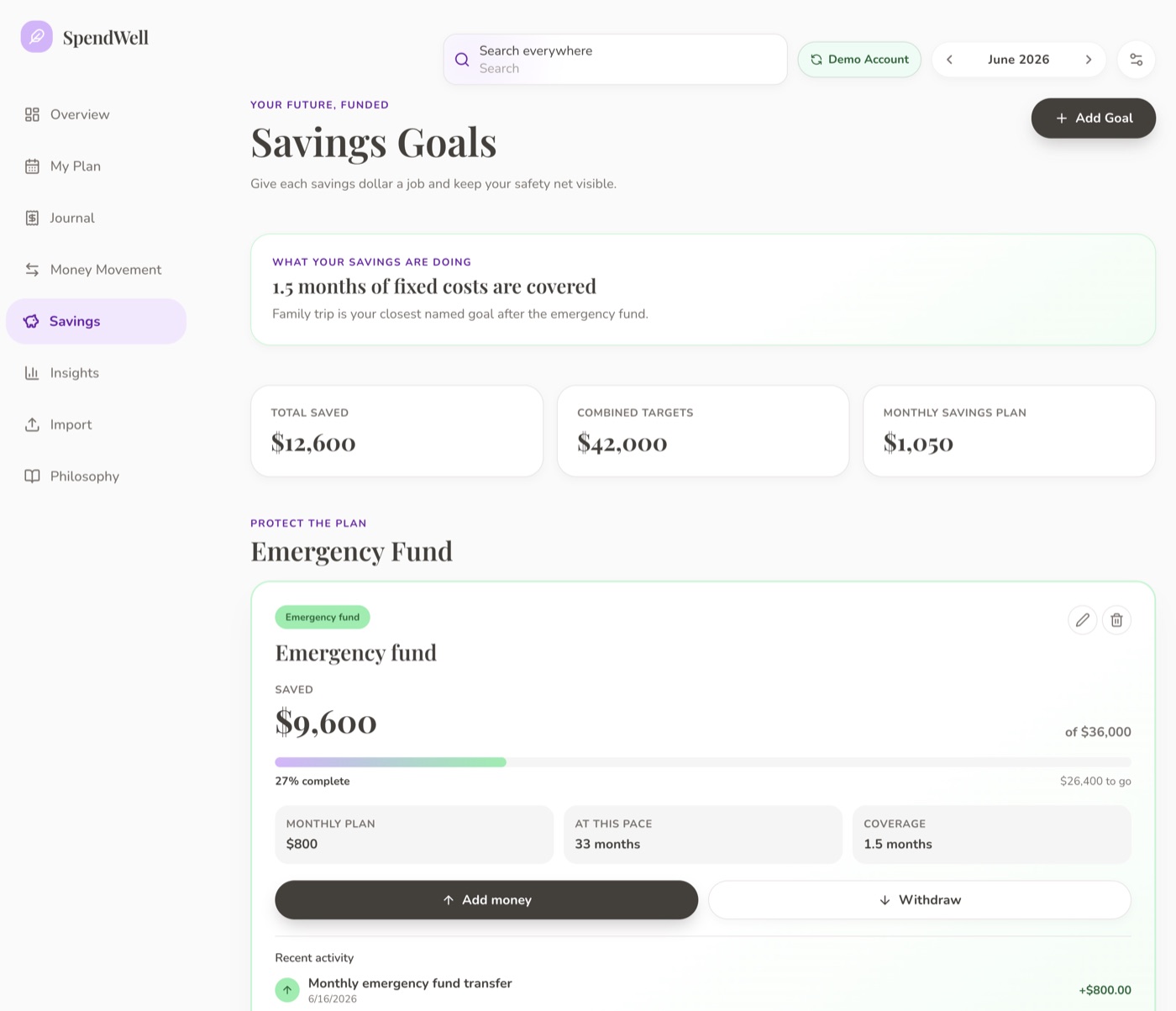
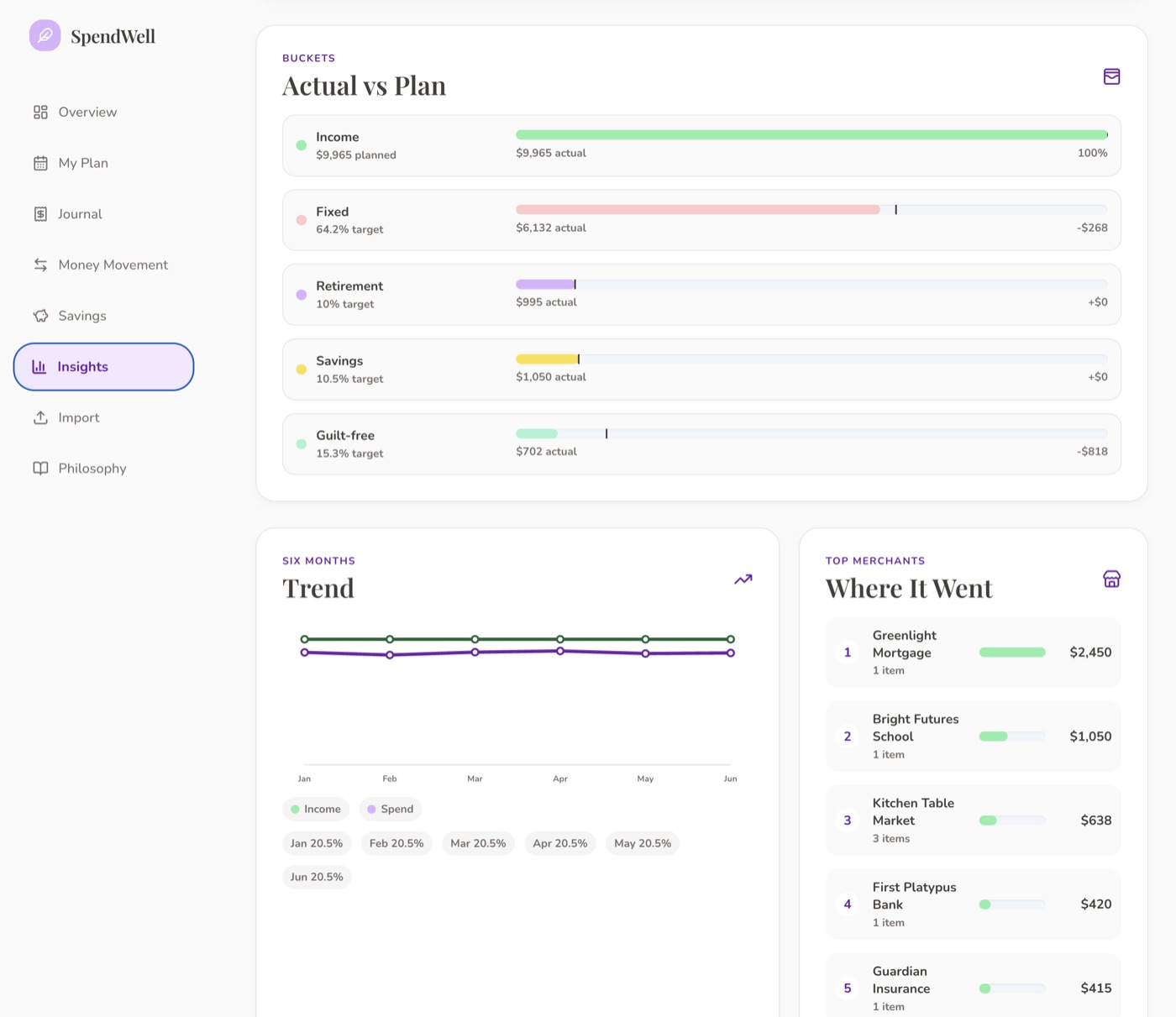
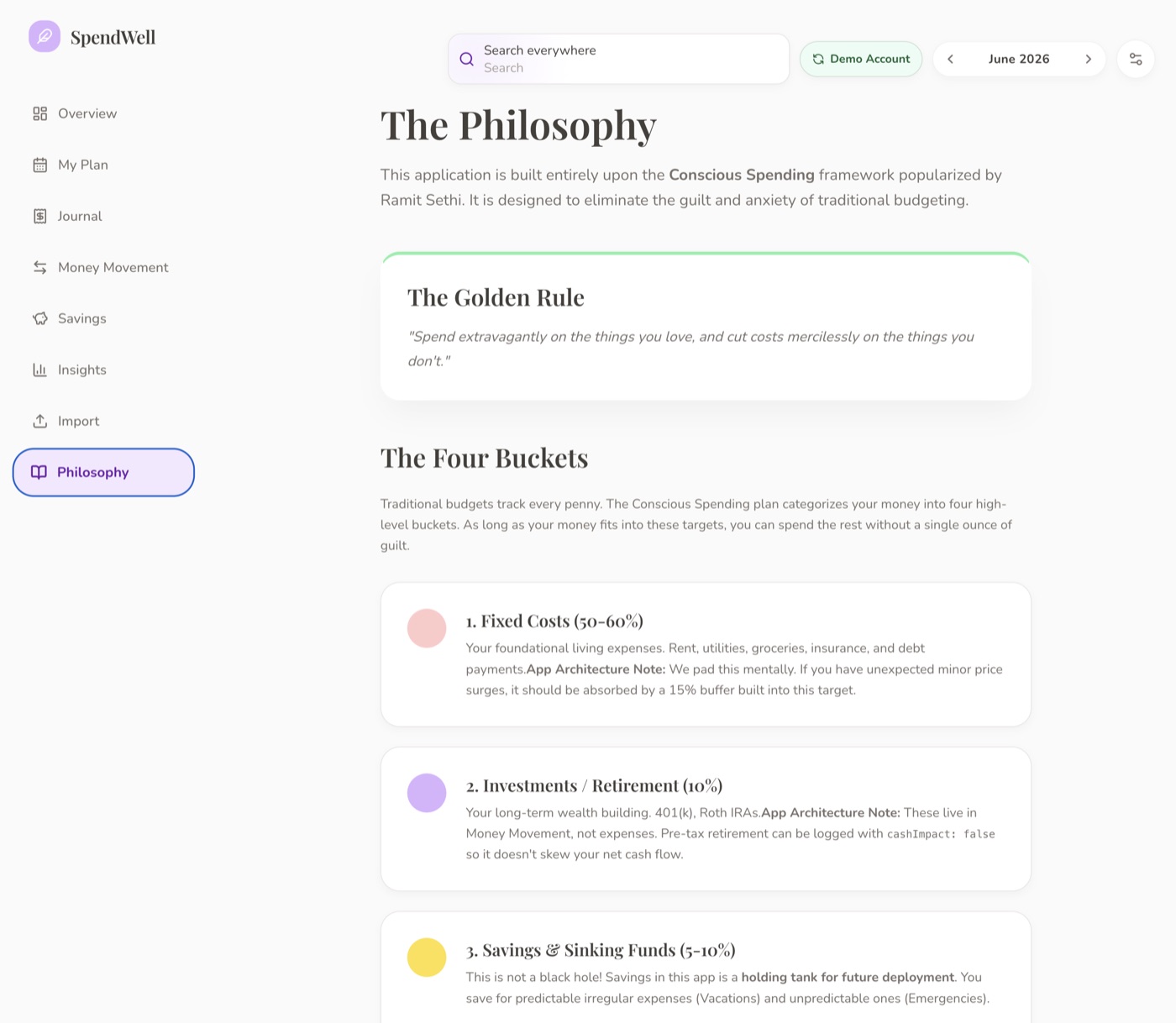
A personal finance app that answers one question: am I basically okay?
React + ViteExpress & SQLitePlaid APIConscious SpendingPrivate & local
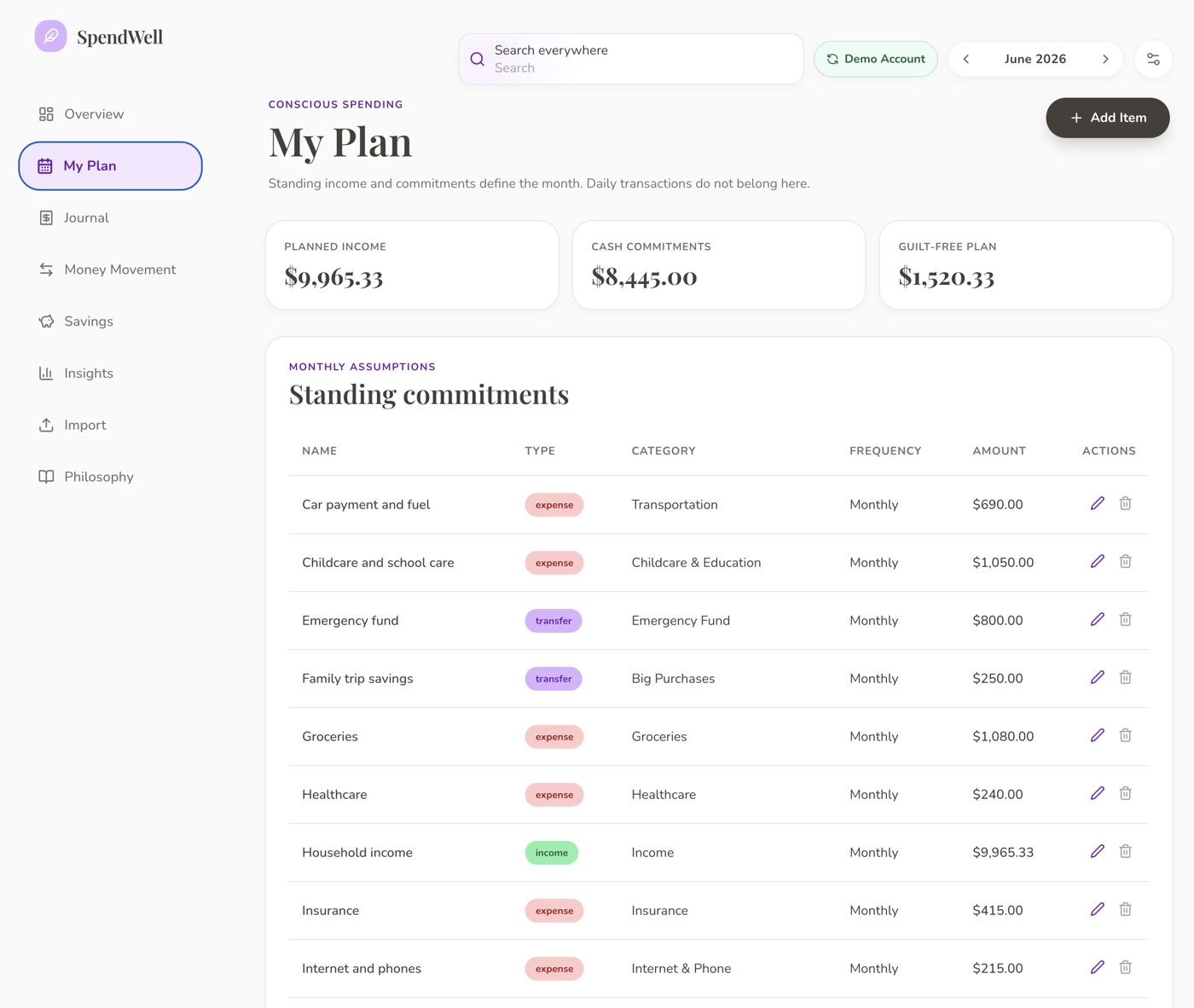
Designed and built a personal finance web app exploring how bank-connected automation could reduce the burden of day-to-day money management. The project adapts the broad idea of conscious spending into a private, non-commercial portfolio case study, with Plaid-connected account data, CSV imports, transaction categorization, review workflows, transfer matching, savings goals, insights, and a calm interface designed to minimize financial busywork rather than increase it.
Built on the Conscious Spending framework popularized by Ramit Sethi, the app replaces penny-level anxiety with four big-picture buckets and one honest question each month. The interface is warm and editorial by design: Playfair Display headings, a cream-and-lavender palette, generous rounding, and bouncy micro-interactions that feel more like a lifestyle magazine than accounting software.
THE PHILOSOPHY
Not a budget. A spending plan.
“Spend extravagantly on the things you love, and cut costs mercilessly on the things you don’t.”
Everything else. Genuinely guilt-free, no shame, no nagging.
As long as the big-picture buckets are roughly right, the rest is yours. The app never moralizes about a coffee.
PRODUCT ARCHITECTURE
Three layers, each with a different job.
The app is organized around how much attention each part should need. Most of the time, you should be in the first layer. The deeper you go, the rarer the visit.
01Normal Life
OverviewMy PlanSavingsInsights
Calm, readable, reassuring. “Am I okay?” answered in seconds.
when something needs attention
02Review
JournalImportMoney Movement
Transaction log, imports, transfer matching. Do it once, then leave.
rarely, when trust needs checking
03Machinery
Money SystemData healthRepairs
The deeper engine: diagnostics, audits, conflict repair, rule tuning.
Plaid OAuth integration pulls transactions automatically. CSV import as fallback. No manual entry required.
02
Transaction categorization
Rules, provider hints, and future AI suggestions. User corrections are always authoritative.
03
Transfer matching
Automatic pairing of card payments and internal transfers so they stay visible without counting as spending.
04
Savings goals
Named goals with targets, progress tracking, emergency fund coverage guidance, and contribution history.
05
Insights & trends
Plan-vs-actual bars, six-month income/spend trends, category breakdowns, top merchants, data health.
06
Review workflow
Needs-review queue, bulk actions, and a journal designed so you do the work once and then leave.
Under the hood: React + Vite front end, Express + SQLite back end, Plaid OAuth for bank connections, CSV import with column mapping, rule-based categorization engine, transfer-matching with ambiguity-aware pairing, a Money System diagnostic layer, 223+ tests across 34 files, and a product philosophy doc that governs every design decision.
DIPTYCH
The best part of Dreamweaver, rebuilt: open an ordinary HTML file, edit it by
sight, and save it without the editor mangling your code.
Local-first desktop appTauri + Rust shellVite / vanilla JSSource-preservingNo DOM serialization on save
A two-pane editor — Design on the left, Source on the right — kept
perfectly in sync.
WYSIWYG editors are all but gone from the landscape. Design view is an afterthought in Dreamweaver's most recent version. The entire app is all but abandoned and locked behind an expensive subscription model. Diptych recovers the one thing Dreamweaver was great for: opening a normal HTML file,
seeing it visually, editing it directly, and saving it without the editor rewriting or damaging the
original code. It is deliberately narrow — not a website builder, CMS, or publishing platform. Just a
lightweight tool for editing local HTML files with a live relationship between Design and Source.
Source Preservation
The hard part wasn’t rendering HTML — it was preserving it.
Most visual editors save by serializing the browser’s DOM, which quietly reorders attributes,
normalizes whitespace, and strips the odd-but-intentional code you hand-wrote. Diptych treats the
original source buffer as the authority. Design view is only a surface; when you edit, it maps the
change back to the exact source range and patches only that. Untouched source stays
untouched. It can even open static accordions, tabs, and <details> in Design view
— without running their scripts or saving any temporary UI state — so hidden content can be edited
safely.
Never serializes the DOM to saveNever runs the page’s scriptsPatches only the ranges you edit
Under the hood: A Tauri desktop app — Rust/Tauri shell, Vite + vanilla-JS frontend
— that opens files from disk and writes them back. The source buffer is the single source of truth;
Design view is a render-and-edit surface only. No DOM or Shadow-DOM serialization on save, and no
page scripts are ever executed. AI-assisted to build, but the scope, constraints, source-preservation
rules, and regression tests were mine.
EDITIONFOUNDRY
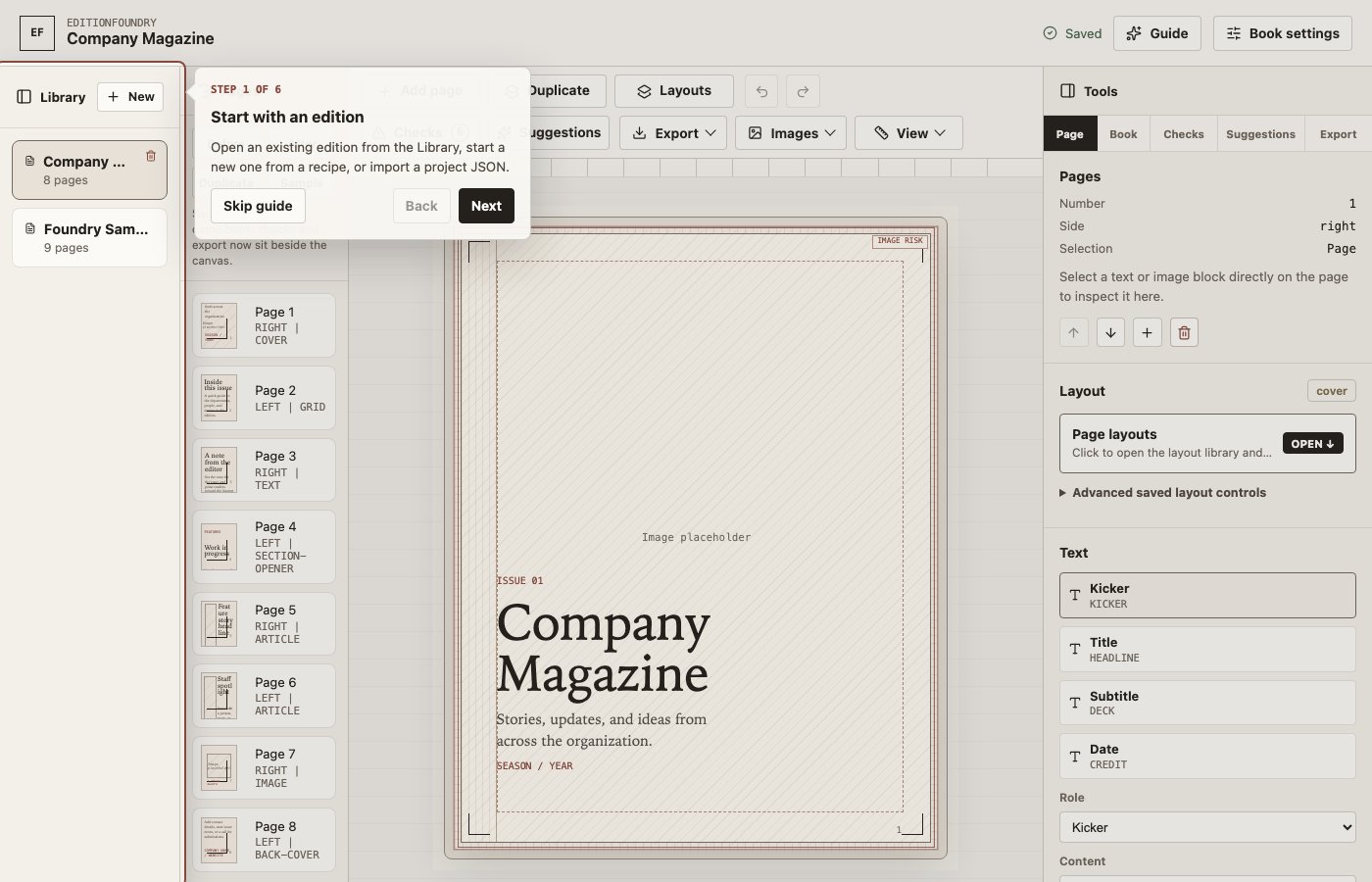
A local-first publishing workshop for structured magazines, programs and guides.
EditionFoundry is a local-first publishing workshop built for marketing teams and editors who need to produce magazines, programs, and guides without understanding InDesign or print-production jargon.
It combines curated page layouts, canvas editing, reusable records, and print-aware checks into a single repeatable workflow. The product direction is beginner-first: start from a recipe, choose page layouts, replace text and images, run checks and export.
ARCHITECTURE
A workflow built around predictable outputs.
01
Predictable Layouts
Built-in layouts stay predictable, preventing the chaos of freeform design while maintaining a high-quality baseline.
02
Local-First Data
The source of truth is a local Publication model with physical format settings and SQLite persistence.
03
Multi-Format Export
Outputs semantic responsive web pages, embeddable viewers, EPUBs, and proof/print PDFs through Chromium.
04
Print-Aware Checks
Includes a beginner export readiness summary and advanced diagnostics to catch errors before printing.
PRODUCT VIEW
A clean, app-like interface for complex document generation.
Under the hood: Built with Vite, React, and an Express local API. Employs Playwright to render proof PDFs and HTML bundles directly through a headless Chromium instance.
Useful little instruments for digital odds and ends.
A recent afternoon with my Kindle Scribe led to an oddly useful idea: when I wasn’t using it, it would make a lovely picture frame. The catch was that the only practical way to do it was to turn an image into a tiny EPUB file, which was much more fiddly than it needed to be. So I built a one-step tool for it, then put it online in case anyone else wanted the same thing.
That small utility became a testbed for sharpening my AI-assisted coding workflow. I gave myself a deliberately unreasonable deadline: build and launch a suite of 12 tools in a couple of days. The tools and the site went live the same day. It has since grown into a live collection of 60+ utilities for common digital chores: some silly, some genuinely useful.
I built it entirely client-side, meaning zero data leaves your browser. No accounts, no tracking. Just fast, good-looking tools that do exactly what they say.
Modern Studio Report taught me that a good dark mode is a different mood, not just an inverted background. Here I pushed it further. Pop is loud, sunny, confident and retro in an over the top not-too-distant-past kind of way. Nova is calm, dark and quiet. The switch up top isn’t a screenshot — it re-skins this very panel, so someone who loves bold color and someone who wants the lights down can both feel at home.
AI testbed
A testbed for turning AI help into working tools.
I also used the site as a testbed for AI-assisted development. I tried several approaches, including running agents in parallel, to build tools out faster. It also made the limits obvious: models help most when the job is tightly scoped, the rules are written down and the output can be checked.
So the site isn’t hand-typed and it isn’t blindly generated. I built a small production line around the work — a queue, a scaffold generator, and a roughly 500-line mechanical verifier with an agent-readable spec — so anything an agent produces has to pass real checks before it counts as a finished tool.
Kindle Wallpaper MakerThe one that started it — frame an image and package it as a Kindle cover EPUB.PDF Slicer & JoinerInspect, pull and reassemble PDF pages in-browser with PDF.js.Image CropperCanvas crop UI with drag handles, a dark mask and a rule-of-thirds grid.Privacy BlurPaint over names and numbers in a screenshot, then export it redacted.Audio SnipperTrim the start and end of a clip without opening a desktop editor.Palette PullerPull the dominant colors out of any image as copyable hex.
Under the hood: Eleventy static-site build, vanilla JS (no framework), a ~3,000-line token-driven dual-theme CSS system, a shared ~53 KB browser library (Canvas, PDF.js, JSZip, Web Audio), a scaffold generator plus a ~500-line mechanical verifier, and an agent-ready tool-building spec. Ships as static files.
SPATIAL SILO
One canonical library for immersive media: VR180, 360, spatial video, 3D,
flat video and images, organized by metadata instead of folder compromises.
Rust + AxumSQLite asset indexFFmpeg media jobsQuest/WebXR playback2D + 3D workflows
2D browser playbackWebXR routeAny-device library modelExperimental ML pipelines
Spatial Silo is my most technically ambitious personal project. The
idea is a self-hosted media library for the material normal apps handle badly: VR180 clips, 360
video, Apple Spatial Video, SBS/TB 3D, flat video, images and camera-native immersive formats.
Instead of splitting everything into separate libraries, Spatial Silo treats format, camera, tags and collections as metadata. Everything
enters one asset pool, then cameras, formats, tags, smart collections and manual collections become
metadata-driven views over the same library. The Plex model has you create different libraries for different media. I wanted a facet-first approach that handles the stranger
end of personal media, and with enough structure that the library can eventually work across ordinary
screens, 3D displays, headsets and browser-based playback.
Projection aware playback
2D, 3D, 180, 360, spatial and derived media routes
01Browser playback
Inline 2D video, image viewing and asset detail pages for ordinary screens.
02Immersive preview
WebXR and A-Frame paths for VR180, 360 and stereo media, with projection overrides.
03Quest-oriented route
Hardware media layers via XRMediaBinding / XREquirectLayer for high-resolution playback.
ADVANCED MEDIA PIPELINES
Beyond cataloging, I wanted room for media-improvement pipelines: interpolation, derived formats and experimental 2D-to-3D work.
60fps interpolation
Temporary playback or permanent library export.
FFmpeg minterpolate→RIFE AI modes→Progressive HLS→Save as asset
Fast frame blending, higher-quality optical-flow/MCI, RIFE via rife-ncnn-vulkan, smart
buffering, cancellation, cleanup and export-to-library jobs.
2D to 3D generation
Experimental depth-based stereo generation.
Live 3D HLS sessions, low-resolution depth sidecars, ONNX/CoreML depth inference, DIBR stereo
synthesis and offline SBS export paths. It is a research pipeline inside the product, not a
finished consumer feature yet.
Under the hood: Rust/Axum backend, SQLite metadata index, watched-source scanner,
FFmpeg thumbnails and HLS derivatives, ffprobe + ExifTool analysis, vanilla JavaScript frontend,
WebXR playback paths, background job tracking, RIFE interpolation, and experimental depth-based 3D
generation.
track record
When people hire me, they tend to keep me around.
“
Ricardo Guise
President & Publisher, World Screen
He's exceptionally good at what he does. But what I'd also want any prospective employer to know is that Simon is a genuinely interesting person to have around. 2026
March 25, 2026
To Whom It May Concern,
I’m writing to recommend Simon Weaver, who joined us in 2008 and served as our Online Director right up until our closure this year. That’s nearly two decades of dedication, and in that time, he became the backbone of everything we did online.
Simon was responsible for the full scope of our digital operations—from developing and maintaining our many newsletters and websites to designing and editing our virtual video festivals and other online presentations. He was also responsible for the delivery of all our daily and weekly newsletters, as well as our promotional material. He provided clients with digital impact reports, giving them detailed stats on their campaigns. As the company moved increasingly toward digital publishing; his role only grew. He took that transition in stride and kept everything running smoothly, even as the demands on him kept expanding.
He’s exceptionally good at what he does. But what I’d also want any prospective employer to know is that Simon is a genuinely interesting person to have around. He brings real energy to the people he works with, and I’m going to miss our conversations more than I can say.
We’re closing after forty years, and Simon leaving is one of the harder parts of that. I’d recommend him without reservation for any organization looking for someone who combines serious technical skill with the kind of personality that makes a workplace better.
Sincerely, Ricardo Guise President & Publisher World Screen
“
Barbara Corcoran
Founder, The Corcoran Group · Shark Tank investor
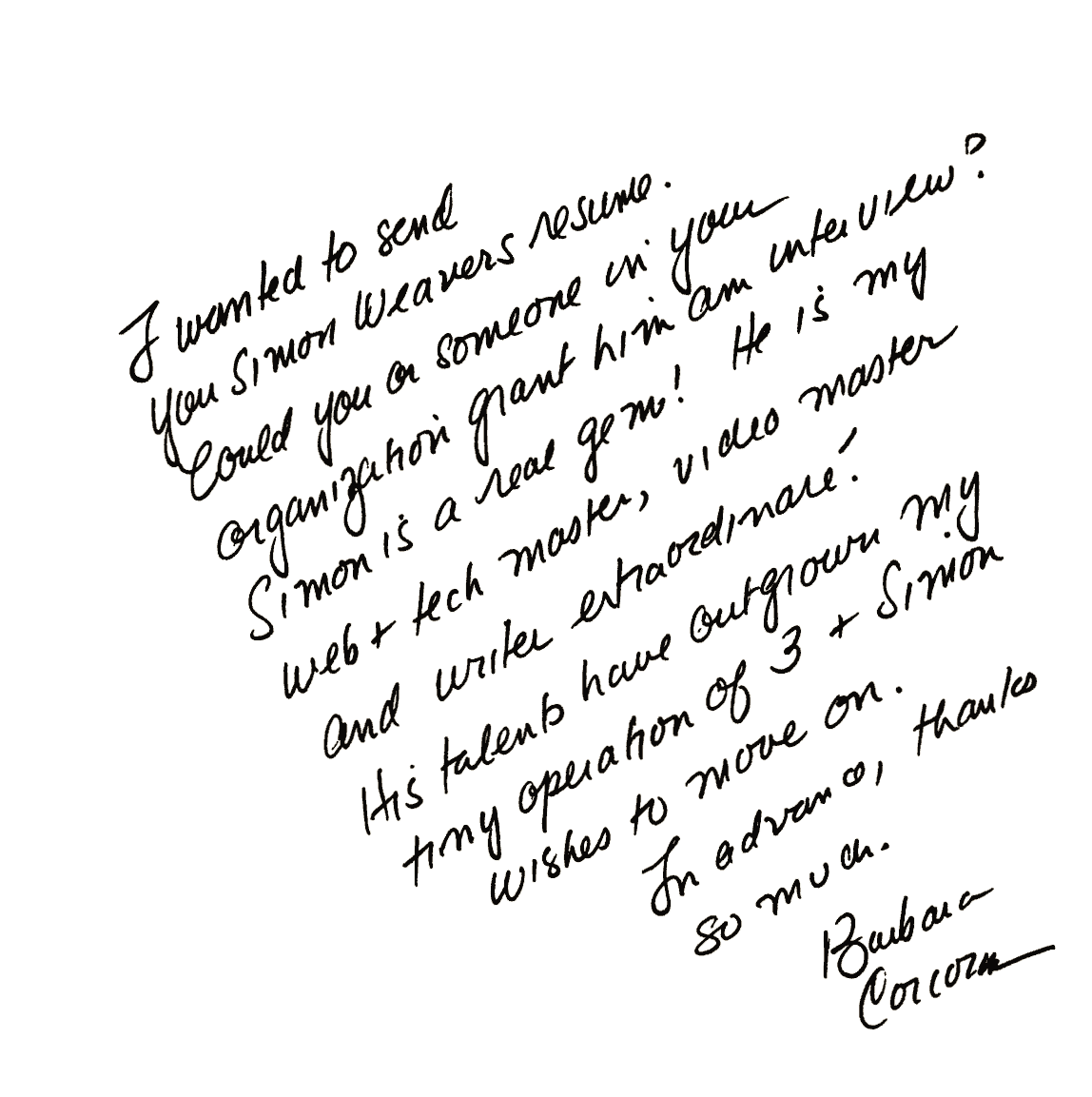
"Simon is a real gem! He is my web + tech master, video master and writer extraordinaire!" 2008.
a little background
Englishman in Brooklyn.
A few detours, a lot of making things up as I went along, and a long-running preference for making complicated things clearer.
I’m from Rochdale, in the north of England, and I’ve lived in Brooklyn since 2003.
Before my run in TV trade publishing, I had a mixed working life: factory summers, supermarkets, a nursing home, country fairs, British Gas billing problems, cheffing on the Isles of Scilly, English teaching in Granada and university teaching in Seoul.
Working with Barbara Corcoran added another kind of training: writing TV pitches, meeting executives, helping turn loose ideas into segments and seeing the work that sits behind something that looks simple on screen.
That range has been useful. I’m comfortable moving between different kinds of people, different kinds of work and problems that do not belong clearly to one department. It is probably why I ended up being useful in the spaces between roles.
PRIOR STOPS: FACTORY · KITCHEN · CLASSROOM · MEDIA
I studied Philosophy and English Literature at university. I thought I’d cleverly merge the two and do a master’s in Critical Theory. I quit at 3 a.m. one night in the University of Nottingham’s computer lab.
I was trying to wrangle Baudrillard and Lacan into a thesis on God only knows what. Then came the epiphany: the words on my page were gibberish. The experience put me off academia for life.
That’s the end of my philosophy story. I at least learned that making simple ideas complicated wasn’t a good use of my time, or anybody else’s. I prefer it the other way around.
BaudrillardLacanCritical TheoryPlain English
I’m interested in useful digital work: websites, publishing systems, editorial tools, AI-assisted workflows, video and media projects, and the awkward problems that appear when one person needs to cover several departments at once.



 Ricardo Guise